Tossed an important file into the trash and need to get it back? If you’ve been backing up your data, you’ll have no problem recovering deleted files on your PC. If not, you can still try a few other techniques to restore deleted files on your PC. Let’s get into the art of Windows file recovery.
1. Check the Recycle Bin
Your first stop is also the easiest. When you delete files, they’re not actually lost permanently. Instead, they’re transferred to your computer’s Recycle Bin, where they sit until you decide to empty it. Until then, they’re only “temporarily deleted.” Here’s how to recover deleted files from your Recycle Bin in Windows 10:
-
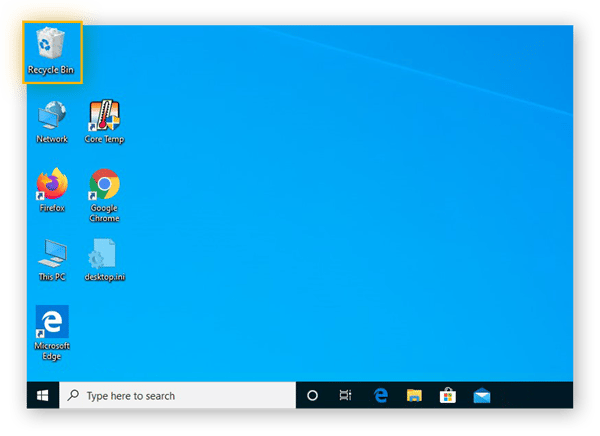
On your desktop, open the Recycle Bin by double-clicking it, or by right-clicking it and selecting Open.
-
Find the file you want to recover, then right-click it and select Restore. This will return the file to its original location on your computer.
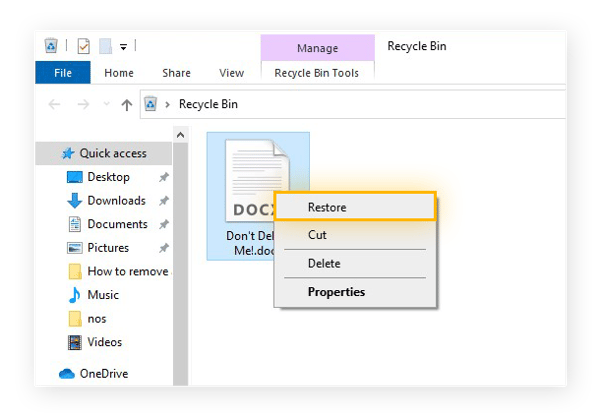
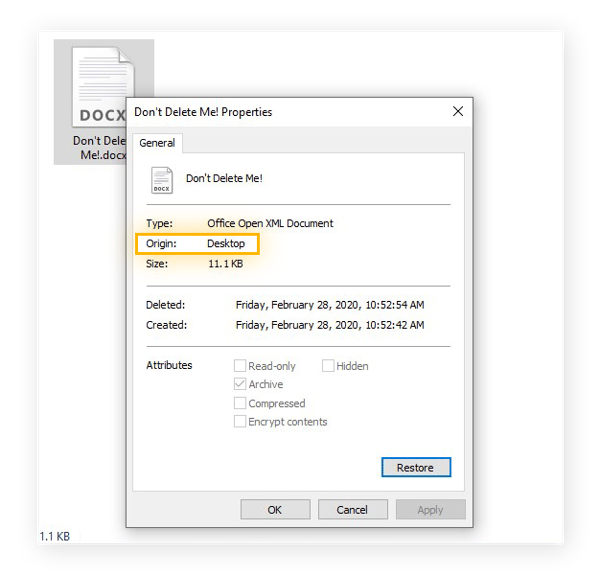
If you’re not sure where it was originally stored, right-click it and select Properties, and you’ll see the file’s original storage location listed as the Origin. After you restore it, it’ll go back there.
-
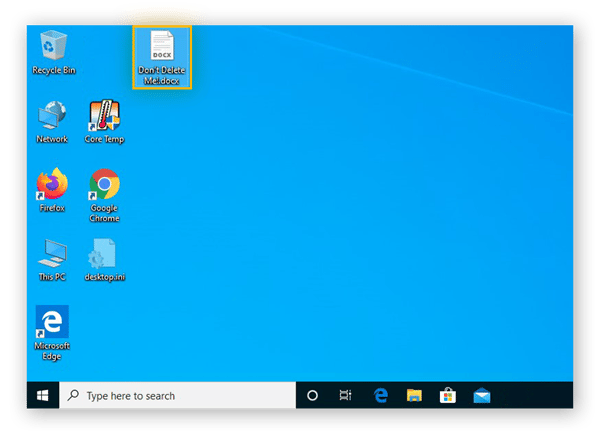
After restoring this file, we can see that it’s back on the Desktop, where it used to be.
Computers can often slow down over time as they accumulate heaps of junk files, bloatware, and other useless data, and deleting these can help bring an older PC back to speed. But if you’ve trashed something that you actually want, have a quick peek in the Recycle Bin, and you might just get lucky.
After you empty your Recycle Bin, these files become “permanently deleted.” But it’s not as finite as it sounds — there are multiple methods for how to recover permanently deleted files from the Recycle Bin. Read on to learn more about what you can try next.
2. Check other folders
Sometimes, the thing you want isn’t where you think you left it last. This is as true for digital files as it is for your keys, glasses, or TV remote. You might have either saved or moved your files to a different folder than you thought.
To search your system for a file, click the Windows icon in the lower-left, then begin typing the file’s name. If you can’t remember the name of the file, try typing any relevant keywords you can think of. Any results will appear in the window you see.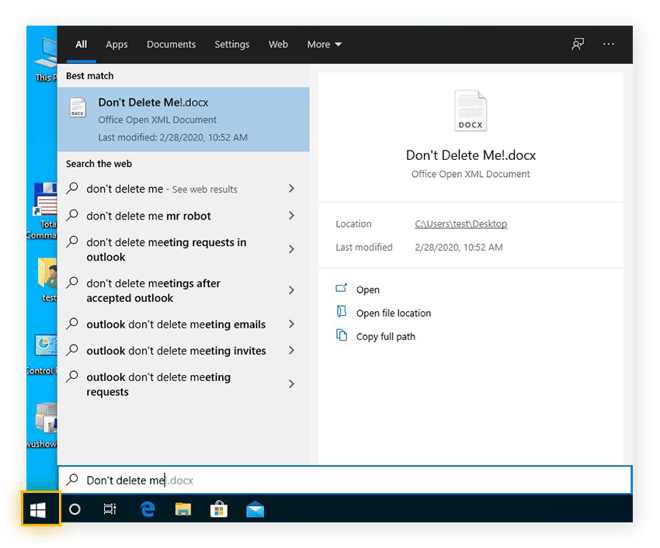
3. Use Windows System Restore
Windows includes an automatic backup feature known as System Restore. When activated, it’ll allow you to revert your computer to a previous state known as a “restore point.” Windows creates restore points from time to time, allowing you to reset your computer to one of these configurations should something go wrong, and you can also create your own.
Usually, people use System Restore to fix software issues, but will System Restore recover deleted files? Well, it depends. If you’ve deleted an important Windows system file or program, System Restore will help. But it can’t recover personal files such as documents, emails, or photos.
Here’s how to use System Restore to recover deleted files:
Using System Restore in Windows 10, 8.1 or 8
For this example, we’ll show you how to recover deleted files in Windows 10. If you’re using Windows 8.1 or Windows 8, you’ll follow a similar procedure.
-
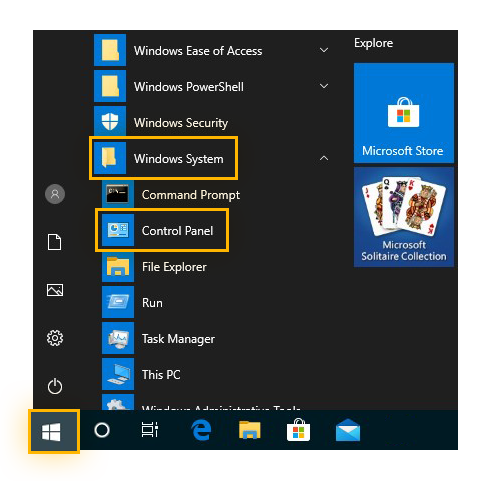
Open the Control Panel by clicking the Windows icon in the lower-left corner of your screen. Scroll down and select Windows System, and then click Control Panel from the drop-down menu. You can also simply type “Control Panel” after opening the Windows menu.
-
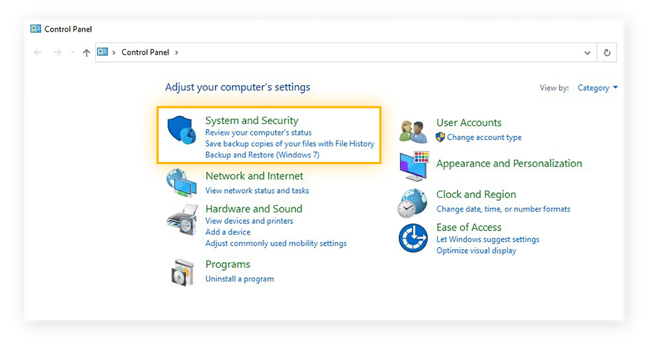
In the Control Panel, click System and Security.
-
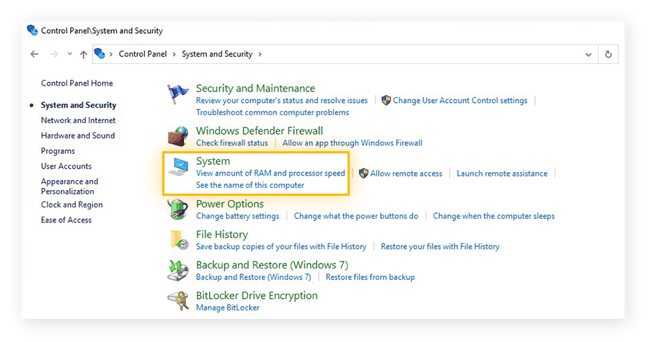
In the System and Security menu, click System.
-
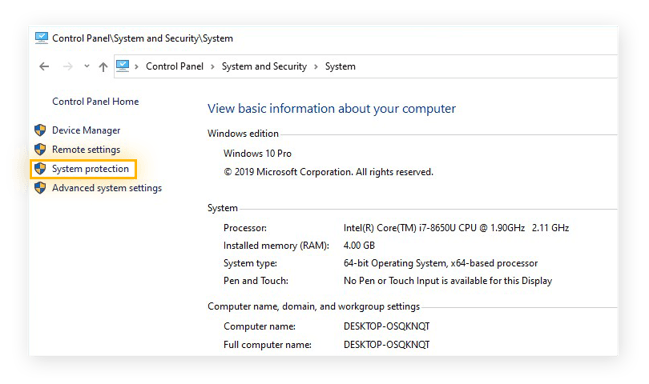
Click System protection on the left-side menu.
-
In the System Protection menu, click System Restore.
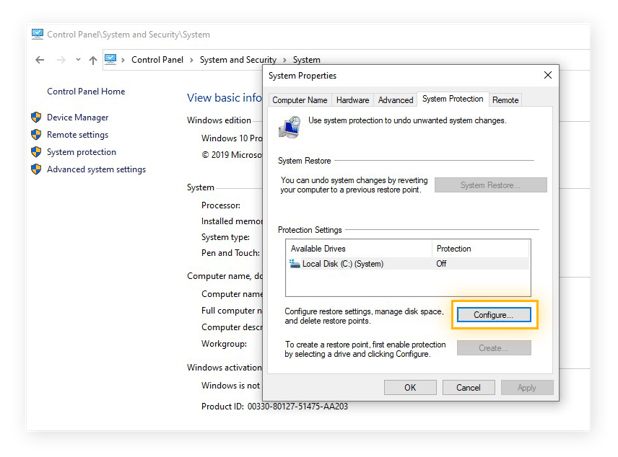
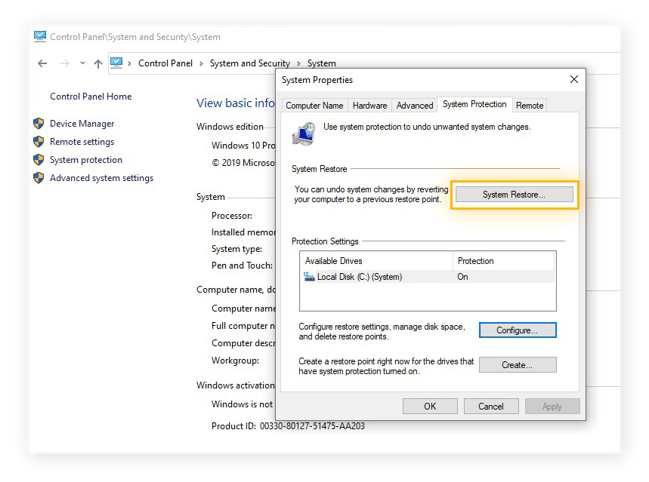 If the button is unclickable, it means that System Restore is currently deactivated, and you won’t be able to use it to recover any deleted system files. If you’d like to use it in the future, here’s how to turn it on:
-
Click Configure.
-
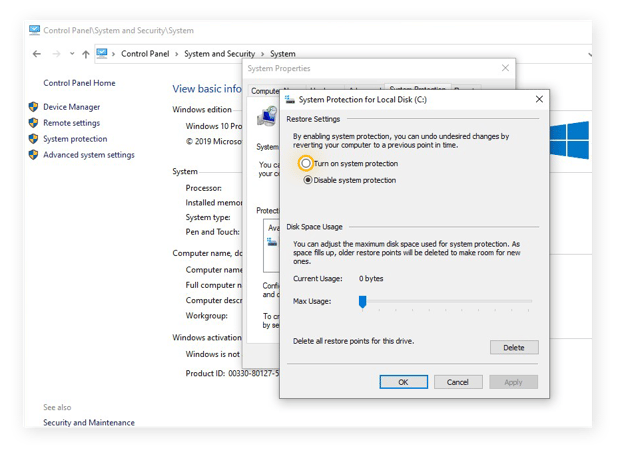
Select Turn on system protection, then click OK.
-
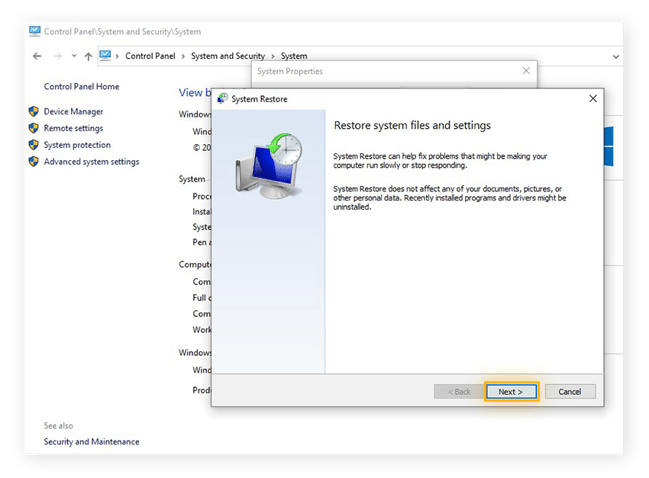
After clicking System Restore, hit Next.
-
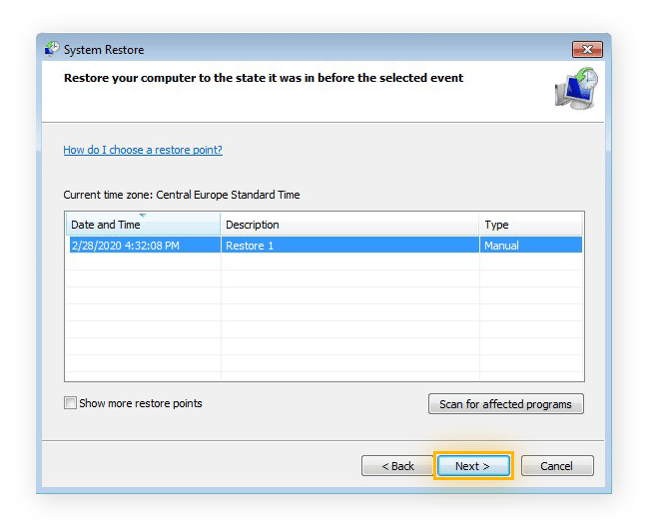
Choose a restore point that will (or should) contain the data you want to recover. Then, click Next.
-
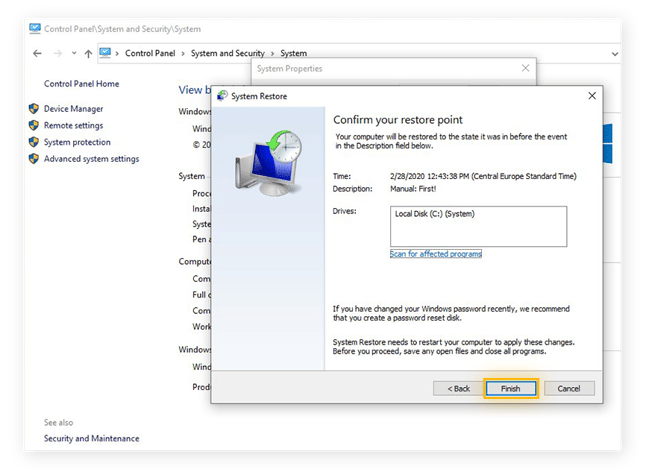
Click Finish, and your computer will go back to that restore point.
Using System Restore in Windows 7 or Vista
Here’s how to recover deleted files in Windows 7 via System Restore. It’s pretty similar to what you’d do on Windows 10, and you can also apply these steps to Windows Vista. Again, System Restore will not recover personal files — it will undelete files that are directly relevant to the Windows system.
-
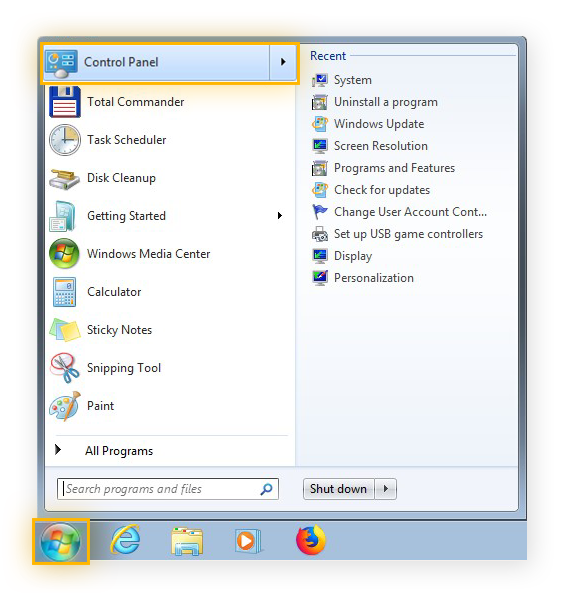
Click the Windows icon in the lower-left corner of your screen to open the Start menu. Then, click Control Panel.
-
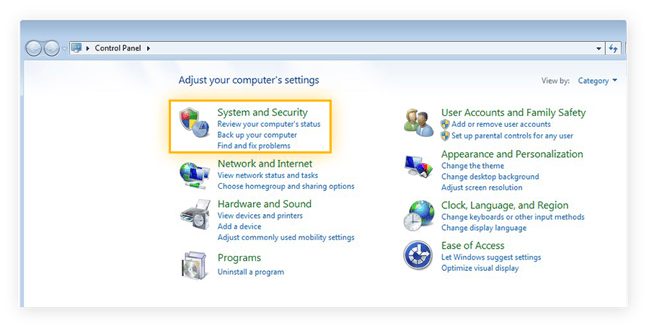
In the Control Panel, select System and Security.
-
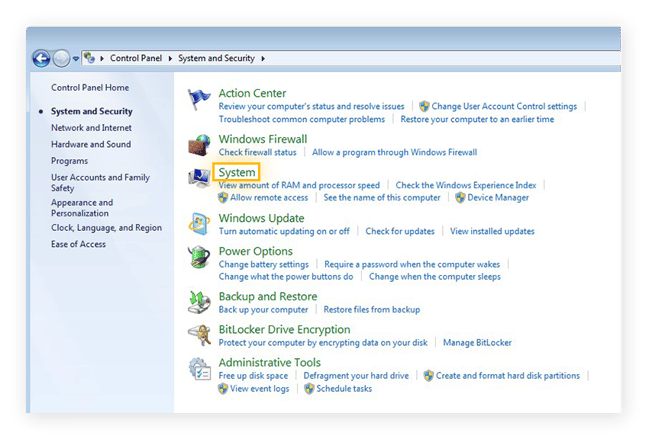
Click System.
-
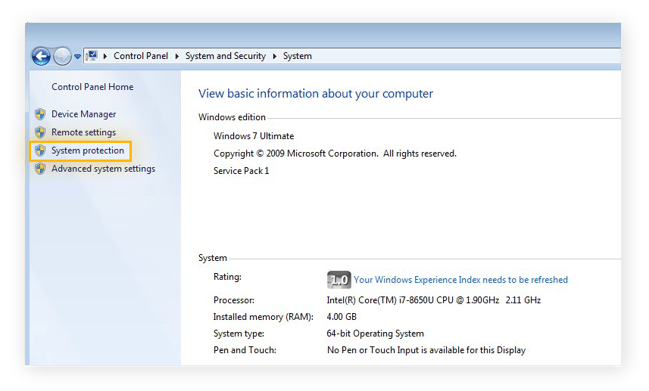
Click System protection in the left-side menu.
-
Click System Restore.
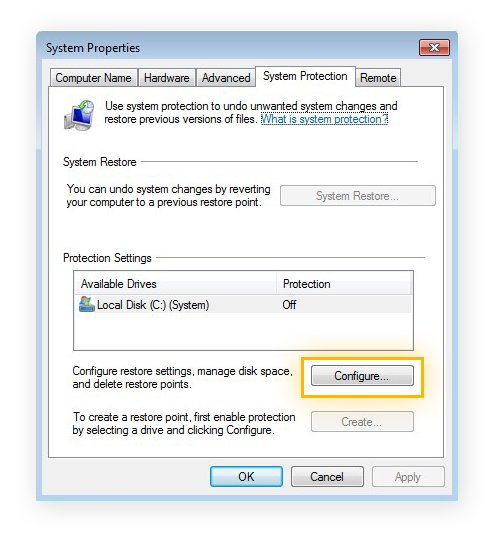
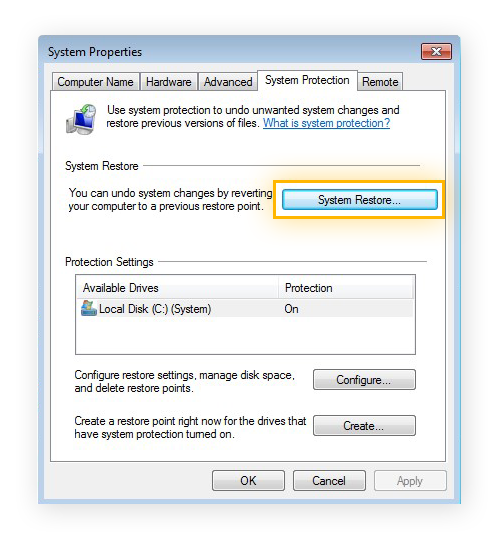 If the button is greyed-out and unclickable, you’ll need to first activate System Restore for your drive. Here’s how:
-
Click Configure.
-
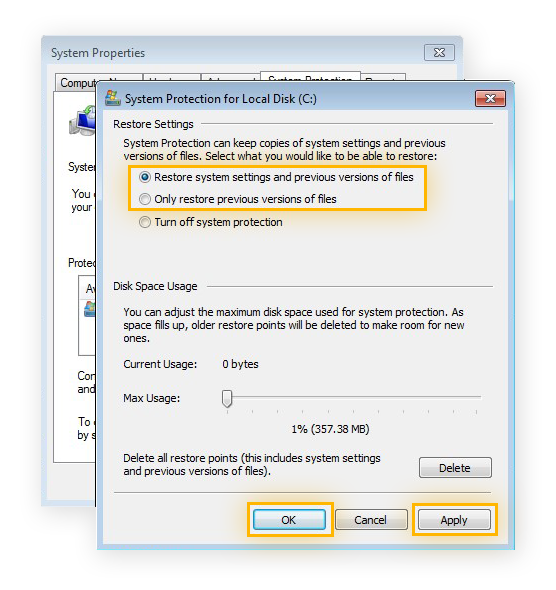
Choose whether you’d like to restore your system settings and files, or just your system files. After making your selection, click Apply, then OK.
-
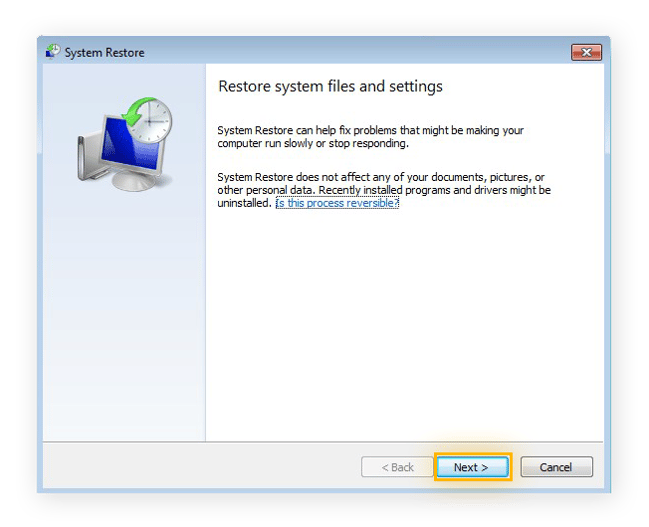
After clicking System Restore, hit Next to begin the process.
-
Choose a restore point that was created before your data was deleted, then click Next.
-
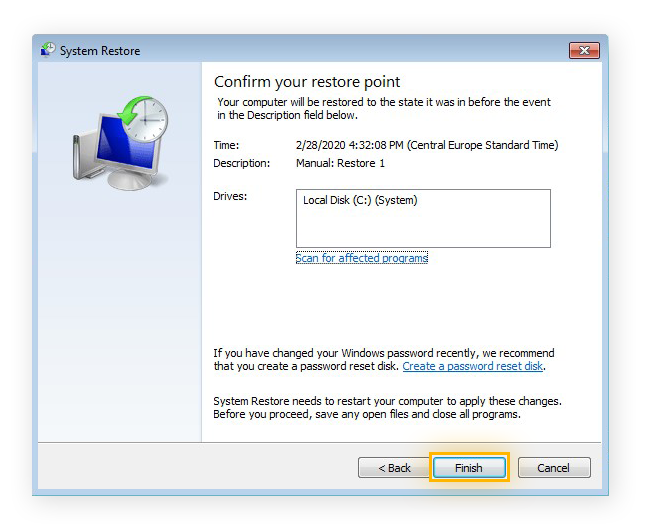
Click Finish to confirm that you’d like to return your system to the selected restore point. Your computer will restart, so make sure to save anything you’re working on first.
4. Restore from a backup
If you’ve been regularly backing up your files, you’re in luck — you’ll already have perfectly good copies of your files ready to go. Making backups of your valuable files is your best defense against accidental file deletions. Backups are also a great asset in the fight against ransomware, which can encrypt your files and hold them hostage unless you pay a ransom fee. If you have recent backups, you can ignore the ransom demands, delete the ransomware, and simply restore from your backups.
Even if you haven’t been performing manual file backups, your computer might have been doing this automatically for you. For example, Microsoft’s OneDrive cloud service offers automatic backups. It’s possible that you might have backup copies waiting for you in your OneDrive account, or in any other similar services that you’ve used.
You can easily create a backup of your entire computer right within Windows by creating a system image. It’s a snapshot of your PC and everything on it from that moment in time, letting you revert to this state should something go wrong in the future. If you’re planning on removing unwanted apps and other junk files, back your system up first in case you make a mistake.
5. Use data recovery software
Even if you don’t have any backup copies of your deleted files lying around, you can still try digging them out of your hard drive with specialized data recovery software. These tools can resurrect permanently deleted files from a drive, even after you’ve emptied your recycle bin.
One popular option is Recuva by CCleaner. It’s a flexible and powerful tool that can help you recover files after a computer crash, or if one of your drives becomes damaged or reformatted. It also works as flash recovery software, meaning it can pull files from rewritable storage such as USB drives and external hard drives.
In order to reduce the risk of your computer overwriting the deleted files on your drive with new data, you may want to stop using the drive until you’ve had a chance to try and recover your data.
6. Hire a professional
If none of the above techniques have successfully recovered your files, it might be time to hand things over to the pros. Have a look in your area for a reputable data recovery specialist or service, and consider letting them take over from here. If your drive somehow gets damaged or destroyed, you can hire someone to salvage your data before you dispose of your device.
In the USA, you can expect to pay upwards of $100 per hour for a qualified data recovery specialist and lab. They’ll have all the equipment, software, and most importantly, the training that they need in order to bring your valuable files back to life. Find a provider who will offer you a complimentary consultation so that you know the potential costs before you agree to pay.
You may run into companies that charge on a per-gigabyte basis — if so, look elsewhere. This type of pricing can quickly spiral out of control. Instead, find a provider who charges hourly, just as you would when hiring a lawyer or auto mechanic.
Restore from AVG Quarantine
Many antivirus tools, such as AVG AntiVirus FREE, place suspicious files in a quarantine while they’re evaluated for malware. Files in the quarantine can’t execute, nor can they access other parts of your system or data. AVG’s antivirus quarantines files automatically when running an antivirus scan, or when its protective tools detect the potential presence of malware.
Have a peek in your antivirus tool’s quarantine section. It may be the case that your antivirus removed a non-malware file, so you can recover it from the quarantine if you’re sure that it’s safe.
Keep your PC clean without deleting files
It’s easier than you think to delete important files while cleaning out your PC. Instead, keep your computer running lean and fast with AVG TuneUp. It’ll scan your entire device for junk files and bloatware, letting you remove them safely without putting your valuable data at risk. Speed up your PC, reclaim your storage space, and optimize your computer for top performance — while leaving your important files and folders right where they belong.