Some of our tips and guides concern critical areas of your system. Before trying any of the suggestions below, back up your system to an external storage device or cloud service.
If you can’t back up your device, at least create a system restore point. Open the File Explorer, right-click on This PC, and select Properties. In the new window, scroll down and click System protection in the Related settings sections and create a restore point. If anything goes awry, you can return here and revert all settings.
How to clean up your PC and hard disk
Over time, your computer collects a wide range of unneeded files, apps, and other data — and this can waste storage space while slowing things down. We’ll show you how to clean up your computer and eliminate all that digital junk.
Find out how to clean out your hard drive, how to identify and remove useless programs, and how to migrate your files to cloud storage to free up more space on your PC.
1. Perform a disk cleanup
Every PC program creates some form of temporary files — files that the programs only use once, but that don’t always get deleted later. These can include old CHKDSK files, Windows Update files, setup logs, and many others. Deleting temporary files can quickly free up lots of storage space.
Disk cleanup in Windows 10
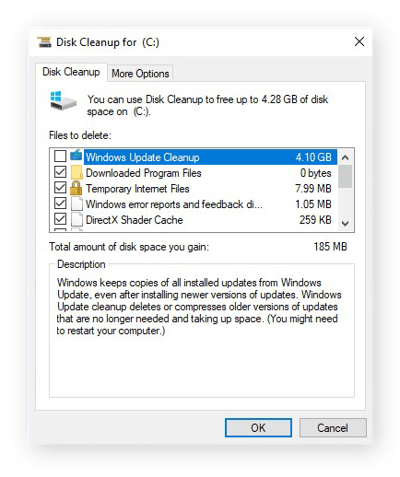
On Windows 10, open the Start menu and type disk cleanup. Click Run as Administrator to open the Disk Cleanup utility.
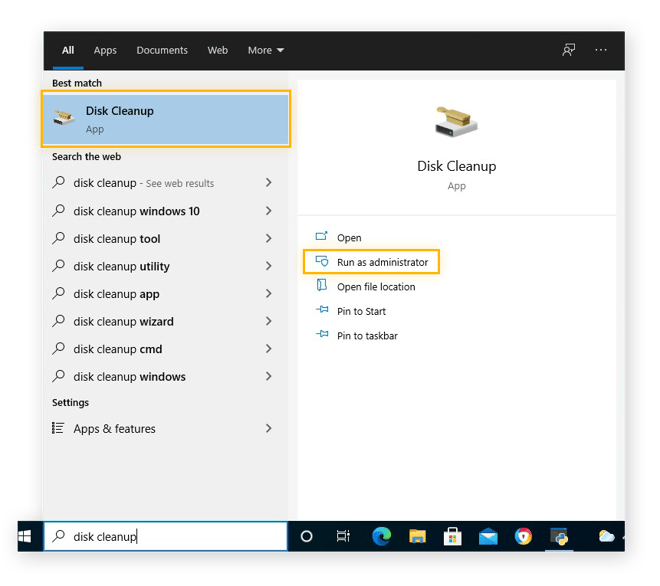
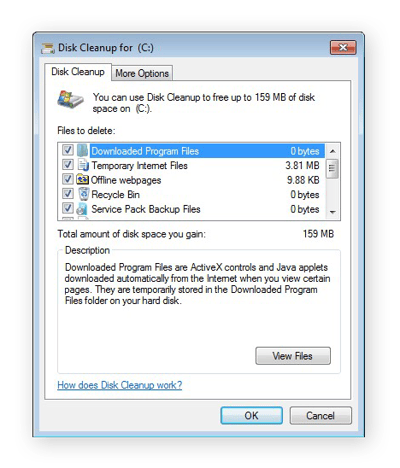
In the Disk Cleanup window, check the types of files you’d like to remove. Then, click OK to delete them.
You can also find your temporary files in Windows 10 via the Settings. Open your Start menu, click the Settings cog, and go to System. Under Storage, click your hard disk and select Temporary files.
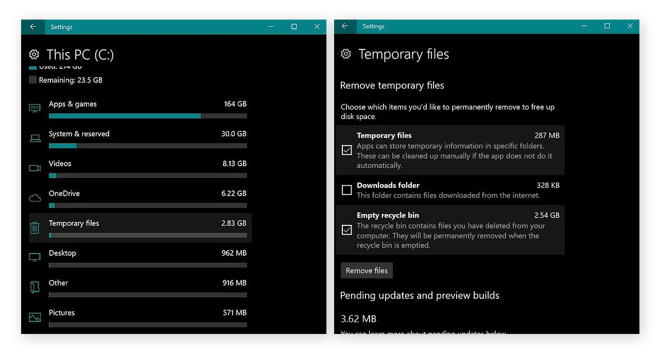
Check the types of files you’d like to remove, then click Remove files.
Disk Cleanup in Windows 8
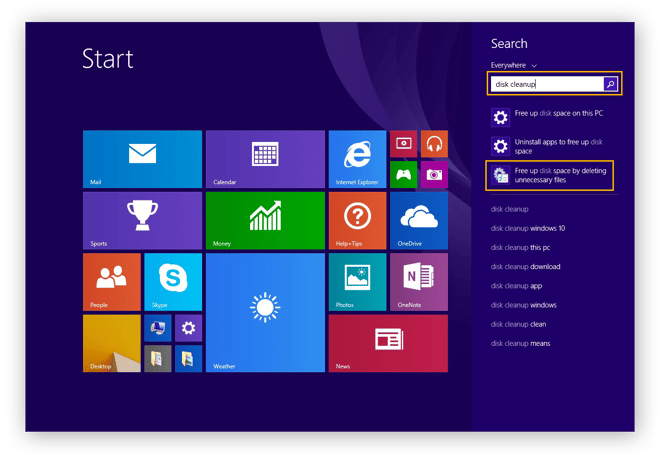
On Windows 8, click the Windows icon in the lower-left to open the Start menu, then type disk cleanup. Select Free up disk space by deleting unnecessary files from the search results.
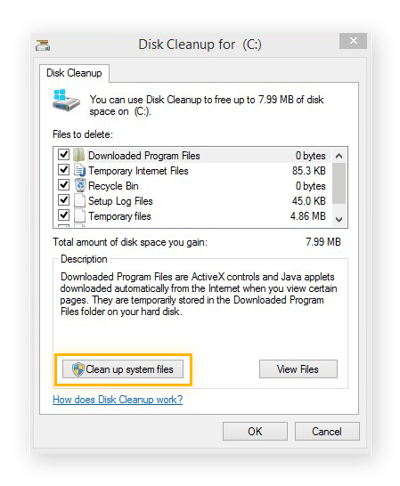
The Disk Cleanup tool will scan your PC for files you can remove. When Disk Cleanup opens, click Clean up system files to re-scan for even more files you can delete. After it scans your PC a second time, check the files you’d like to remove, then click OK to delete them.
Disk Cleanup in Windows 7
On Windows 7, open the Start menu and type disk cleanup. Right-click Disk Cleanup in the results and select Run as administrator.
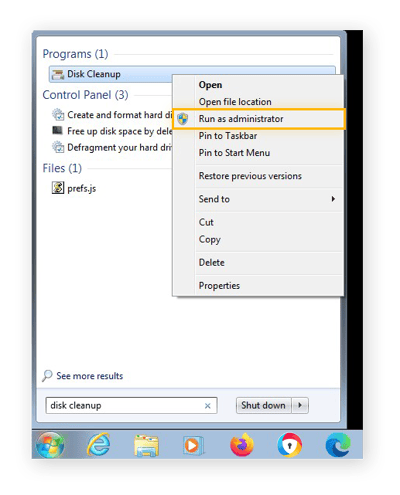
Check the types of files you’d like to remove, then click OK to delete them.
2. Use a specialized cleanup app
The built-in Windows cleaning tools won’t remove nearly all of the junk hidden on your PC, because Disk Cleanup won’t remove files created by individual apps. AVG TuneUp can clean out the files created by hundreds of different programs.
Here’s how to use AVG TuneUp to clean up your PC.
First, download and install AVG TuneUp.
Click Free Up Space to explore all the temporary files AVG TuneUp can find. You’ll often free up gigabytes of useless data that you can now use for new programs, music, photos, or anything else you need.
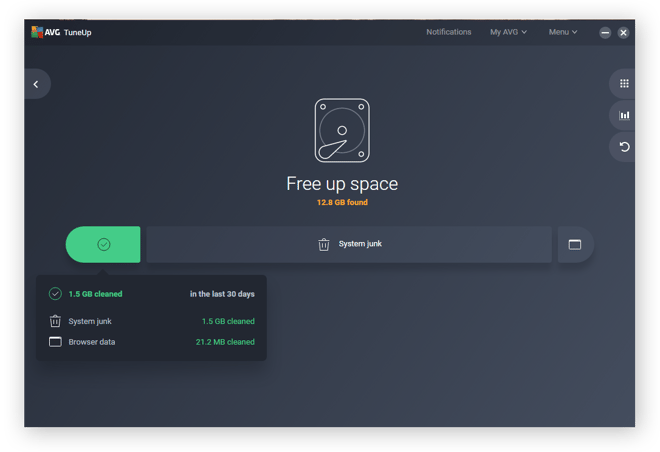
Our Disk Cleaner removes leftover files generated by crash reports, caches, old thumbnails, lists of recently used files, various gaming files, and much more.
3. Delete huge files to free up space on your hard drive
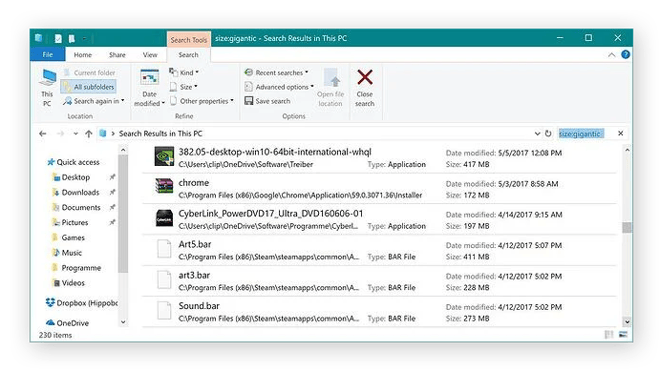
Windows Explorer makes it easy to clean your computer by finding the largest files on your hard disk. Open your Explorer and click the Search field. Then click Size and select Gigantic to see all files larger than 100 MB.
4. Uninstall applications you don’t need
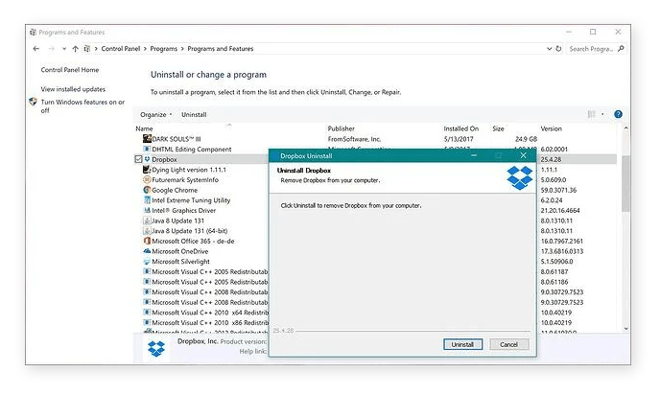
It’s easy to forget about apps you no longer use. Clean up your computer and get rid of unnecessary apps in the Windows Control Panel. Click Programs, then click Programs and Features. Go through the list and uninstall anything you don’t need.
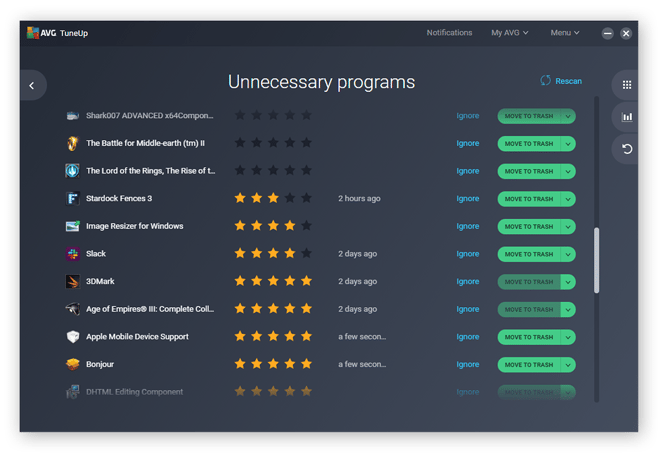
Control Panel won’t tell you whether a program is important or not, nor will it show you when you last used it. But AVG TuneUp makes it easy to identify programs you don’t need. After downloading and installing AVG TuneUp, go to the list of unnecessary programs and move any that that you don’t need into the trash.
5. Use CHKDSK to test your hard drive’s integrity and health
Any file on your HDD or SSD can get damaged if your PC loses power or crashes. Check your hard disk’s integrity by clicking your Start button and typing the letters cmd. This will bring up the Command Prompt. Right-click on it and select Run as Administrator.
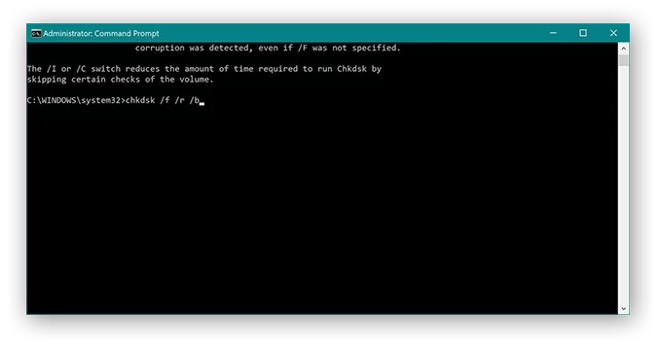
Enter chkdsk /f /r /b and hit Return to run the CHKDSK tool. Confirm that you want to scan your disk upon the next reboot, then restart your PC. The CHKDSK tool will evaluate your drive for errors and attempt to repair any it finds.
Depending on the size of your disk, this check and repair process can run for more than an hour. But in the end, you’ll have fixed some hard disk problems and repaired critical files — or you’ll learn that everything is fine.
6. Use cloud or external storage if you’re running out of local space
If you need more free space, consider uploading some of your larger files to a cloud service, such as OneDrive or Google Drive. Your internet speed will determine how quickly your computer can access these files, but cloud storage is a good solution if you’re constantly running low on hard disk space.
You can also get an external storage drive that plugs into your computer via USB. Move files on an external drive to clean out your computer and save space.
7. Clear your browser cookies and cache
Your browser stores a bunch of small files that can quickly add up when you’ve got a lot of them. These include:
-
Cookies: Cookies are small files that share information about you with the websites you visit. Some cookies help websites remember your user preferences, but others track you around the internet.
-
Cache: Your browser stores elements of the websites you visit in its cache. This helps your browser load websites faster on subsequent visits.
Periodically delete your browser cookies and purge your cache to both clear space and protect your privacy. Clearing cookies improves your browser speed and performance, and it prevents people from collecting data from the digital trail you leave behind.
Meanwhile, emptying your cache forces your browser to load fresh versions of the websites you visit. This ensures that you’re seeing only the most current content while you browse.
While you’re at it, consider deleting your browsing history as well. This won’t speed up your computer, but it will help protect your privacy. Finally, use one of the best secure and private browsers to make sure all your personal info stays protected.
How to speed up your computer
Here, we’ll show you how to speed up your computer with a full set of performance-optimization tips, tricks, and tweaks. From a RAM upgrade to a CPU overclock to a thorough physical cleaning, the following techniques will give you everything you need to get your computer back in tip-top shape.
1. Upgrade your RAM
Your PC uses RAM, or random access memory, to manage all active tasks and apps. Think of RAM as your PC’s short-term memory. Modern computing generally requires a minimum of 4 GB of RAM. That’s mostly because of two types of applications:
-
Resource-intensive apps like video editing, gaming, Photoshop, programming apps, and online streaming platforms.
-
Browsers. Having multiple tabs open at once can easily push RAM use over 2 or even 3 GB. That will slow down your browser and leave barely enough room for Windows itself, let alone any other program.
Without enough RAM, your PC can’t handle everything you’re doing, and its performance suffers. Upgrade your RAM if you have less than 4 GB of RAM in your PC.
8 GB of RAM is enough, unless you’re playing intensive games or working with large files and need a really powerful computer. RAM is more affordable than it used to be — check our guide to upgrading RAM, as it’s got everything you need to know about how to do this yourself.
If you’re upgrading a laptop, make sure it’s eligible for RAM upgrades, since not all laptops are. Desktop PCs should be able to take RAM upgrades — just open up the case and locate your memory slots. Check the specifications of your PC to make sure your new RAM module will fit, or ask an expert to help you.
2. Upgrade to an SSD
Your PC’s hard disk is its long-term memory — where it stores Windows, your programs, and all your personal files. Most PCs still have a mechanical hard disk drive (HDD), and unlike your CPU and RAM, HDDs are painfully slow.
If you can, get an SSD (solid state drive). With no moving parts and instant access to all data on it, SSDs are faster than HDDs and will significantly increase your read and write speeds. Windows will load faster, files will open instantly, and apps will run smoother.
The prices of SSDs continue to fall, and even an economically priced disk will breathe new life into an aging PC. Upgrading to an SSD also results in less power consumption and more battery life for laptops.
3. Upgrade your GPU
Are you a gamer, designer, or video editor? If so, RAM, hard disks, and even your CPU aren’t your top concern. Your graphics card powers your video editing and gaming. If Grand Theft Auto 5 or one of your other games isn’t performing well, your graphics card is likely to blame.
On laptops, the GPU (graphics processing unit) is usually soldered to the mainboard and can’t be upgraded. But desktop PCs can be upgraded with new GPUs.
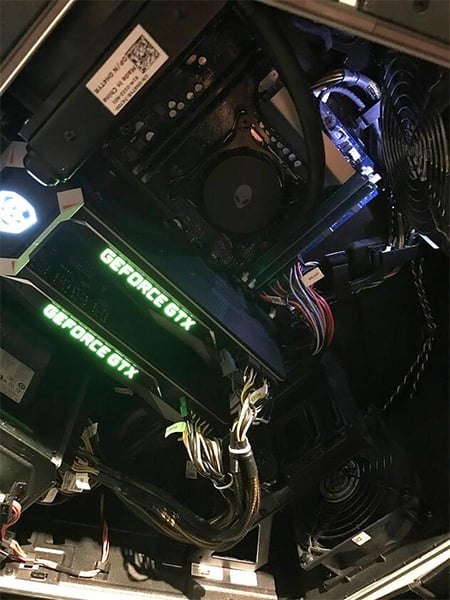 The insides of a computer with two GeForce GTX graphics cards.
If you’re looking to upgrade your GPU, market leaders NVIDIA and AMD have a wide range of options. But many popular GPUs are either sold out or very expensive, because Bitcoin and other cryptocurrency enthusiasts use powerful GPUs when building cryptomining PCs.
-
Full HD gaming and rendering: The AMD Radeon RX 550 and RX 570 offer great gaming experiences at Full HD resolutions (1920 x 1080), or 1080p.
-
1440p higher-end gaming and rendering: If you want to play at Full HD with maximum graphical settings or if you have a screen with WHQD resolution (2560 x 1440), the Nvidia GeForce RTX 3070 or AMD Radeon RX 5700 are good options.
-
4K ultra-high-end gaming and rendering: The ultimate gaming machines need top-tier GPUs capable of putting out 4K gameplay at a minimum of 60 FPS (frames per second). Look for the Nvidia GeForce RTX 3080 or 3090, or the AMD Radeon 6800 XT or 6900 XT.
Here are some other ways to optimize your gaming PC and increase FPS.
 Powerful GPUs give you stunning visuals on The Witcher 3 and other games.
4. Defrag your drive
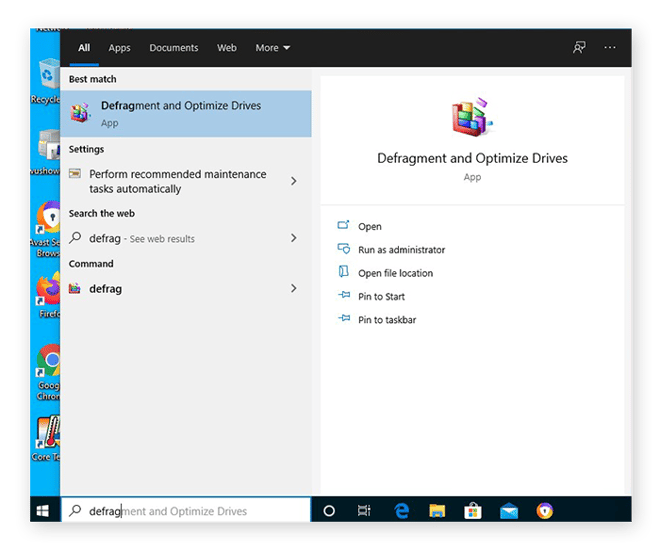
Along with being slow, HDDs also suffer from fragmentation. The more programs and files you use, the more cluttered your disk becomes. Defrag your disk by opening up your Start menu, typing in defrag, and hitting the Enter key.
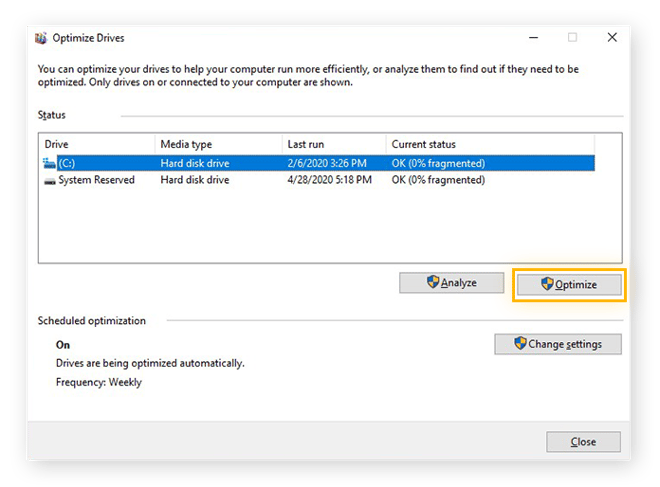
Click Optimize to start the process — but be patient, this might take a while.
5. Disabling startup items in Windows Task Manager
Is your PC taking too long to boot up? It might be loading too many programs that you don’t need. Use Windows Task Manager to review the programs that automatically run at startup.
Right-click on your Windows taskbar and select Task Manager. Go to Startup and look at the items listed.
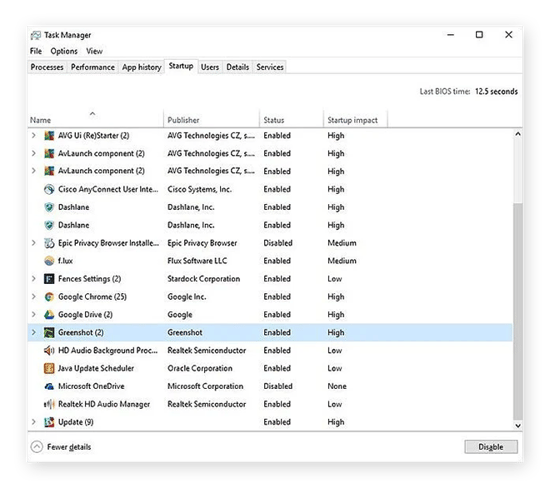
Review the apps here and remove those you don’t need when your computer starts up. To prevent an app from launching automatically at startup, right-click on it and select Disable. If you’re unsure, look it up to find out what it is.
Reduce startup delays even further with a few tips for speeding up boot time, and brush up on the most common boot-time myths.
6. Use a patented method to reduce daily slowdown
Many programs install software components that run even when you’re not using them. These are:
-
Services: They provide basic functionality like keeping products updated.
-
Scheduled Tasks: These background tasks are mostly used to perform actions at specific times or in certain situations.
-
Startup items: Startup items are additional programs that launch every time you turn on your PC. But while services and scheduled tasks run mostly in the background, startup items tend to be more visible and show up on your taskbar.
There are many reasons why your PC gets slower over time, but background apps are among the most significant. They can put significant stress on your computer, reducing memory, increasing heat output and power consumption, and causing Windows to deprioritize active tasks.
Finding and deactivating every cause of computer slowdown is a never-ending task. Thankfully, specialized software like AVG TuneUp, with its patented Sleep Mode, detects the programs slowing down your PC and suspends them until you actually need them.
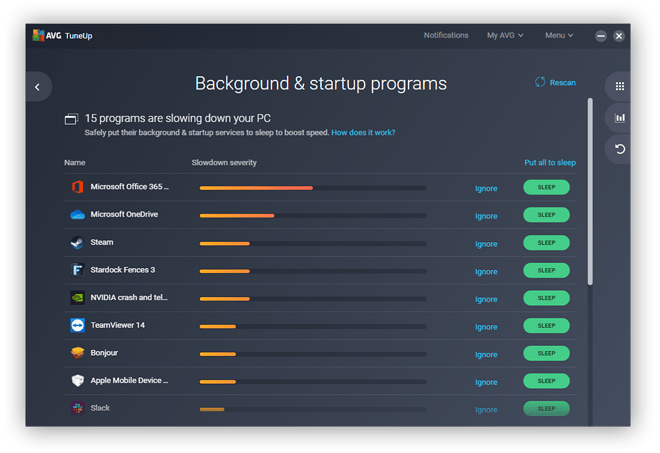
Whenever you open an app, Sleep Mode un-snoozes it, then puts it back to sleep when you’re done. Use Sleep Mode on as many applications as you can, and you’ll notice a considerable speed improvement on your PC.
Download AVG TuneUp for PC today and let Sleep Mode boost your PC’s speed and performance automatically.
7. Overclock your CPU or GPU
Overclocking your CPU or GPU makes them work faster and gives you more processing power. Though not as dangerous as it used to be, overclocking increases the stress and heat put on your PC’s hardware. In most cases, your CPU or GPU will switch off when overstressed or overheated, and Windows will freeze before real damage occurs.
Overclocking is an advanced process that requires you to monitor your CPU temperature. Don’t overclock your hardware unless you know what you’re doing.
Overclocking the CPU
Unless you’re doing a lot of CPU-intensive tasks, such as multimedia editing or running lots of apps at the same time, you won’t feel the difference of a CPU overclock. But if you want optimal performance, try Intel’s own Extreme Tuning Utility.
With this tool, you can easily adjust the CPU clock speed. Increase in increments of 50 MHz, and test your system’s stability under various high-stress scenarios before increasing further.
Overclocking the GPU
Usually, your graphics chip is what causes jittery or laggy gameplay. To improve performance, try overclocking your GPU to run it beyond factory settings. You can overclock your GPU’s processing chip and memory speed with tools like MSI Afterburner.
On our own gaming PC with two Titan Xp graphics cards, after overclocking the GPU by 200 MHz and the memory by 500 MHz, gaming performance climbed by 15%, and we saw the best possible frame rate and picture quality on even the most demanding games.
But not all chips react the same to overclocking. And without a specialized cooling system, your computer may overheat before you can significantly overclock your GPU.
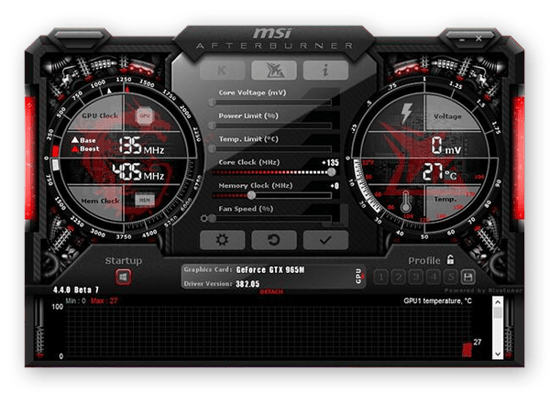 The MSI Afterburner GPU overclocking tool for Windows 10.
If you have a dedicated graphics chip, such as the GeForce GTX 965M (shown above) or the Radeon Pro 460, you can overclock laptops. But thermal issues are more prominent with laptops, because heat doesn’t dissipate easily in small enclosures. So you generally won’t be able to push the clocks past 100 or 150 Mhz.
Plus, due to the increased power draw, your battery life will suffer.
8. Update your drivers
Your PC comes with more than 100 built-in components: the Wi-Fi chip, the processor, the graphics card, the power button, and loads of other parts.
All the components are controlled by device drivers, which are small, complex pieces of software. And just like any piece of software, drivers can be faulty and fail to deliver the full potential from your hardware. That’s why updating your drivers is crucial to keeping your PC performing at top speed.
The process is easy with dedicated driver updater software that quickly detects outdated drivers and updates them automatically, so you’ll never need to worry about outdated drivers.
9. Update your OS
Microsoft constantly tweaks Windows. While many of these updates patch security holes like 2019’s BlueKeep vulnerability, others are performance-based.
Make sure you’ve updated to Windows 10 (or even update to Windows 11). Microsoft has stopped issuing security updates for Windows 7, so moving to Windows 10 will give you much more protection against vulnerabilities that can be exploited.
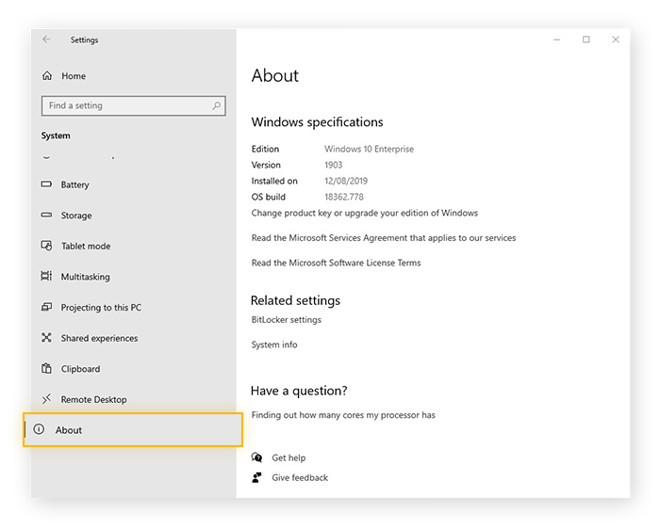
Whichever edition of Windows you’re running, be sure to use the most current version. Check which version of Windows you have by opening your Windows menu and navigating to Settings > System > About.
10. Registry cleaners
The Windows Registry is a crucial part of your Windows operating system. It often contains hundreds of thousands of entries, out of which thousands might be invalid or empty. Registry cleaners find these problematic entries and delete them or fix them as needed to clean up your registry and speed up your PC.
If you’re experiencing error messages on startup, get a professional registry cleaning tool from a reputable provider to clean up your Windows Registry.
11. Remove viruses and other malware
Computer viruses and other malware aren’t just a major security risk. Some can seriously affect your PC’s performance. If your PC is running slow despite all your noble efforts, scan for viruses and malware with dedicated security software.
The award-winning AVG AntiVirus FREE automatically monitors your PC for malware and deletes any that it finds. And it’ll block incoming malware and other threats, keeping you safe against future infections.
12. Physically clean your computer
Your PC or laptop fans keep your computer cool by cycling air through it — but they also collect loads of dust. Excess dust slows down or even stops your fans, which traps heat and leads to poor performance and frequent crashes.
That’s why I physically clean my computer by opening up my PC case and laptops to remove dust bunnies with compressed air. While you’re at it, give your monitor and keyboard a good cleaning as well.
When you’re done, make sure cool air can reach the vents. Place laptops and desktops on hard, flat surfaces (no carpets) and try to avoid using your laptop in bed.
13. Prevent programs from running in the background
Programs that operate in the background — when you’re not using them — will drain memory from more important tasks. Prevent programs from running in the background so they only consume memory when you’re actively using them.
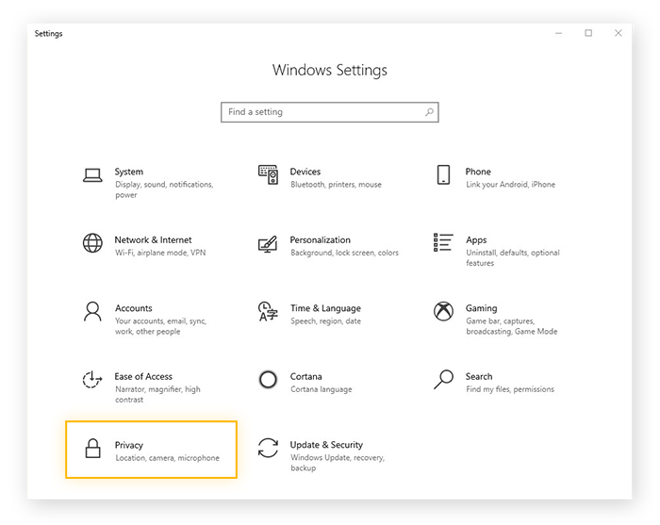
Open your Settings and select Privacy.
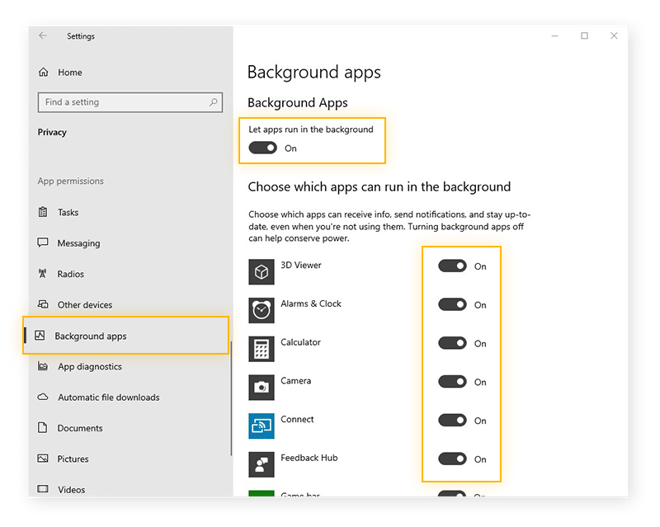
Select Background apps from the menu on the left.
To prevent all apps from running in the background, flip the toggle next to Let apps run in the background to Off. To prevent individual apps from running in the background, flip their respective toggles to Off.
14. Try Windows troubleshooters
Windows troubleshooters are built-in optimization tools that analyze your system and suggest ways to quickly optimize performance.
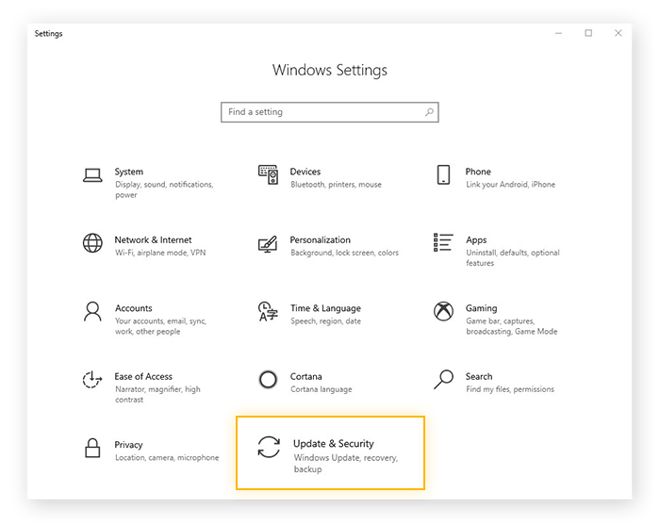
Open your Settings and select Update & Security.
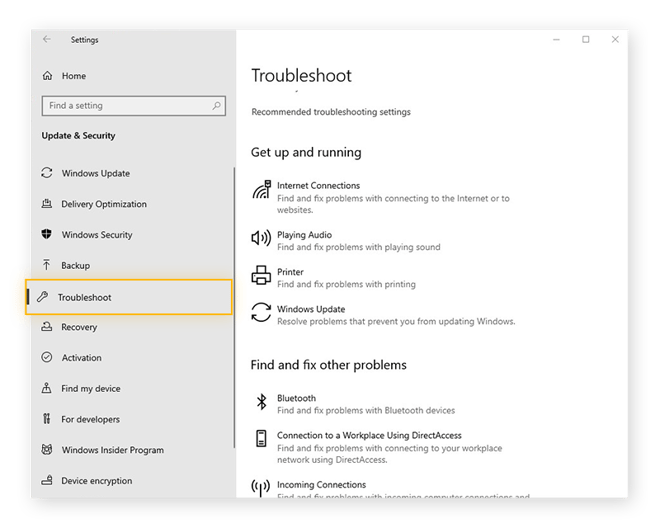
Select Troubleshoot from the left menu. The troubleshooting utilities will evaluate your system’s performance.
15. Adjust your visual effects
Windows features a range of stylish visual effects, but you can improve performance by turning them off.
Type adjust appearance into your Cortana search bar or directly into the Start menu. Then, press the Enter key to open the Performance Options.
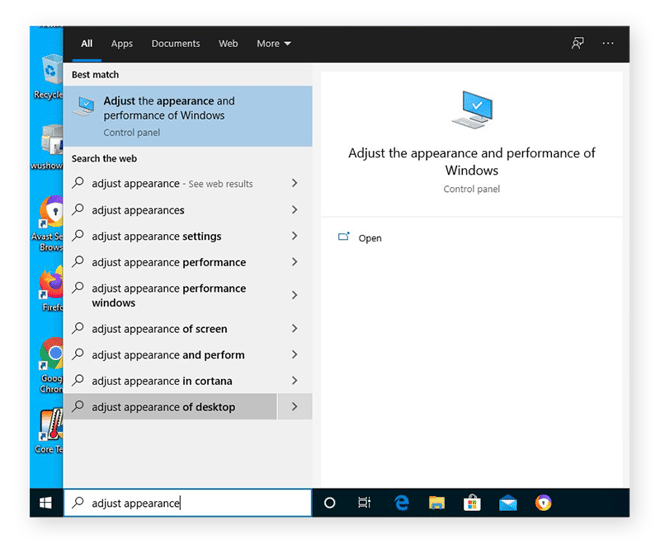
Select Adjust for best performance to let Windows optimize visual effects automatically. You can also enable or disable individual effects.
16. Increase virtual memory (advanced)
With virtual memory, your computer allocates part of your hard drive to handle less-active processes, freeing up your RAM for whatever you’re doing right now.
If you’re getting an error message that warns, “Your system is low on virtual memory,” or if you need to increase it for other reasons, you can give this a try. But a virtual memory increase is only for advanced users.
Additionally, your hard drive isn’t meant to rapidly switch between tasks — that’s why you have RAM. If you rely too heavily on virtual memory, performance may suffer severely.
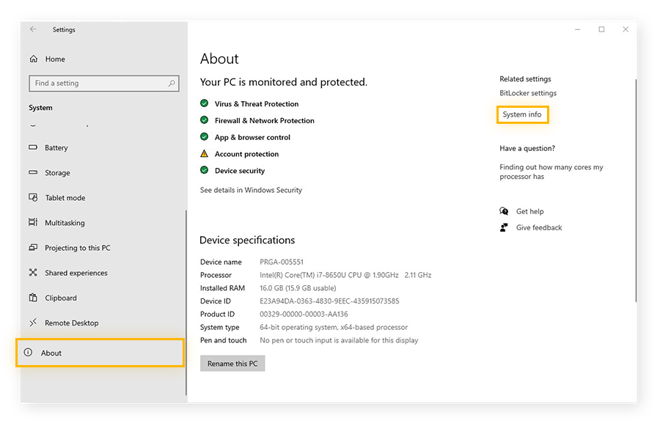
To increase virtual memory in Windows 10, open your Settings and select System.
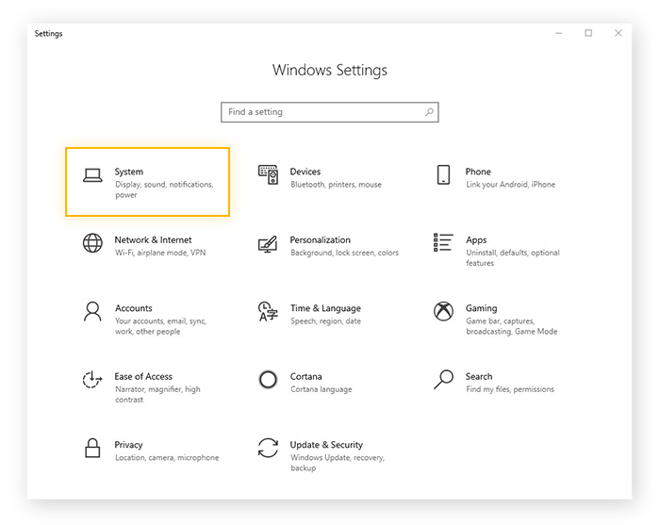
Select About from the menu on the left. Then, select System info from the Related settings on the right. If you don’t see the Related settings, expand your window horizontally until you do.
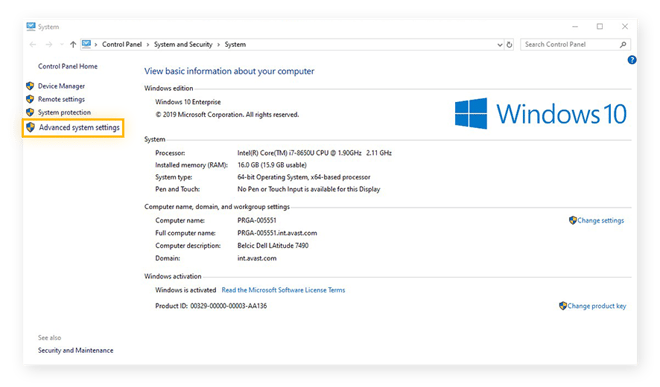
This opens the System settings in your Control Panel. Select Advanced system settings from the options on the left to open the System Properties window.
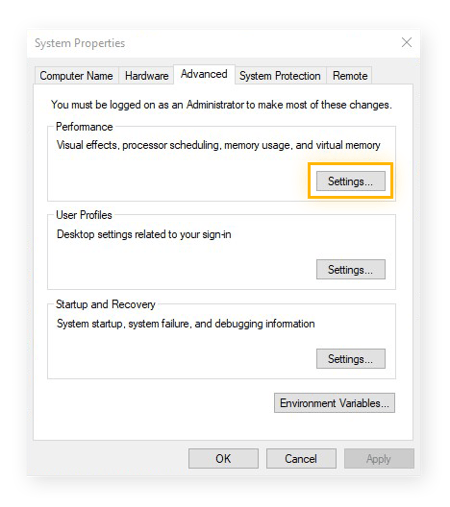
Click the Settings button in the Performance section to open the Performance Options window.
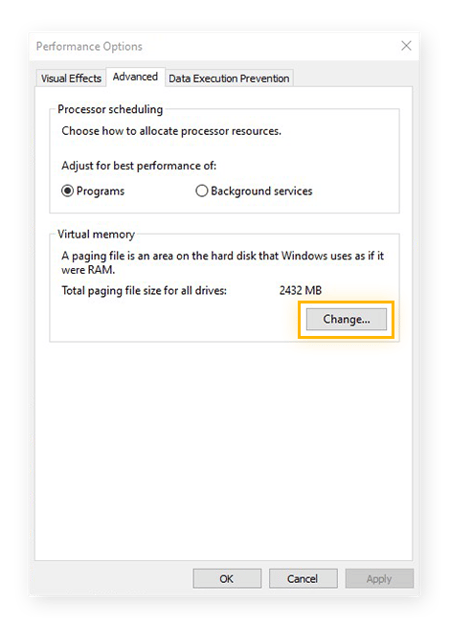
Select the Advanced tab. Then, click Change.
Uncheck the box next to Automatically manage paging file size for all drives. Instead, select Custom size.
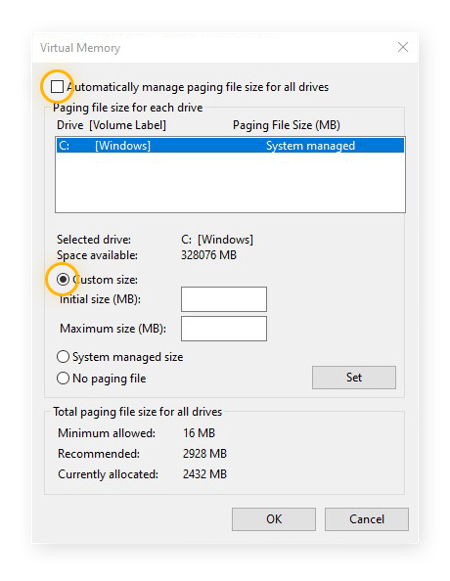
At the bottom of the window, note the Recommended and Currently allocated memory amounts. If the latter is smaller than the former, set the Recommended amount as the new Initial size. Set a Maximum size that is larger than this value.
The following formula can help you calculate your Initial and Maximum virtual memory: Set the Initial size as 1.5 times your current RAM, and your Maximum as triple your current RAM.
As an example, 4 GB of RAM works out to 4,096 MB. With that amount of RAM, you’d set the Initial size as 6,144 MB, and the Maximum size as 18,432 MB.
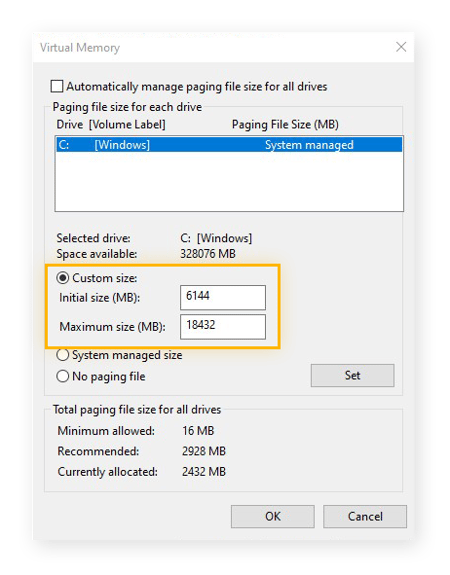
When you’re done, click Set, and then confirm by clicking OK. Finally, restart your computer.
Why is my computer so slow?
Usually, your computer slows down because it’s not using its resources efficiently. There’s only so much processing power, memory, and storage space available on your PC, and the key to speeding up your computer is to optimize all three.
If you’re wondering why your PC gets slower over time, it’s likely due to one or more of the following reasons:
-
It’s too hot. Your computer will self-regulate performance to compensate for excessive heat. A cool computer is a fast computer. Check your CPU temps to see if things are getting too hot.
-
Your software is old. If you’re behind on your Windows updates or need to find updated drivers, you might suffer performance losses.
-
It’s doing too much. If you’re running too many programs at once, too many background processes, or if your disk usage is at 100%, your PC won’t be able to optimize performance.
-
You’re running low on memory. Your PC uses RAM to run its active programs. Maxing out your RAM can lead to a sluggish PC.
-
You’re running low on disk space. As your hard drive fills up, your PC has less room for temporary files. Without enough space, your PC won’t be able to prevent hard drive fragmentation. Cleaning out your computer will free up valuable disk space.
-
You’ve got malware. Many types of malware, such as adware and spyware, chew through your PC’s resources and slow it down.
AVG TuneUp is your all-in-one performance booster and PC cleaning tool. Not only will it optimize your PC’s speed and performance, but its built-in Disk and Browser Cleaner tool will free up tons of storage space.
How to update your applications
Our studies have shown that over 52% of applications installed on PCs are outdated. Sometimes that’s due to people ignoring updates. Other times it’s because the applications don’t include a working updater.
Old apps can cause stability and performance issues, so be sure to check out our guide on updating your apps.
Get a cleaner and faster computer automatically
Now that we’ve covered the most important tuning and cleaning steps, it’s good to repeat them regularly. But if manually cleaning and tuning your machine sounds like a hassle, then here are a few tips to reduce the work and still maintain a healthy PC:
-
Remember to uninstall apps you aren’t using regularly. If you just need it once, uninstall it after you’re done.
-
Go through the list of all your installed programs to see if you can remove any you don’t use.
-
Periodically back up your PC, especially if you reinstall Windows. If something ever goes wrong, you can go back to that previous state.
AVG TuneUp handles PC cleaning automatically. After installing it, it’ll automatically clear our junk files, update your software, uninstall unwanted programs, and perform a whole suite of regular maintenance tasks — all without you having to do a thing.
FAQs
How to make PC startups faster?
For faster startups on your PC or laptop, customize which programs open on startup and other settings, and upgrade from HDD to SSD storage. For even faster boot times and slicker all-around performance, use a PC optimizer equipped with cleanup tools and a driver updater to shut down unnecessary background processes. And always keep graphics drivers updated.
Why is my download speed so slow on my PC?
There are several reasons why your internet may be running slow. First, check your router and ensure your Wi-Fi is working. Then, boost your Wi-Fi signal strength to try to get a stronger connection. Slow download speeds could also be caused by ISP throttling. But PCs do get slower over time, so sluggish download speeds may simply be a sign that your computer is old.
How do I clean the inside of my PC?
Before you go poking around inside your PC, use a guide to help you physically clean a computer. You’ll need a screwdriver to open the casing and a can of compressed air to blow away dust and debris from internal components such as the CPU, RAM modules, and your SSD or HDD. When cleaning the insides of your PC, pay particular attention to the computer fan and ventilation ducts.
Can I make my PC faster for free?
Many of the most effective ways to speed up PCs — such as removing unwanted programs — are quick, easy, and cost nothing except a bit of time and patience. Check out some of the best free PC cleaners. But if you want to automate the process, and do it comprehensively, the best way is to use a premium PC cleaner software like AVG TuneUp.
Can a virus make my computer slow?
Viruses and other forms of malware can slow your computer down by running background processes that max out your memory and cause 100% disk usage. If you think your machine may have been infected, get rid of viruses and malware on your computer immediately by running a full-system scan with a malware and virus removal tool.